


Akitio MyCloud Mini – Review
March 2012 – We recently had a chance to test the Akitio MyCloud Mini Personal Cloud Server. The product which supports DLNA, UpnP, eSATA, 10/100/1000 Ethernet, and USB 2.0 is designed to be a central connection and NAS controller for a home/small business media network. The compact device (~12cm X 12cm X 3cm ) has a core web server and configuration manager to support external HDDs, internet access and act as a RAID complaint backup node and media distribution center.
Akitio My Cloud Mini Personal Cloud Server Overview
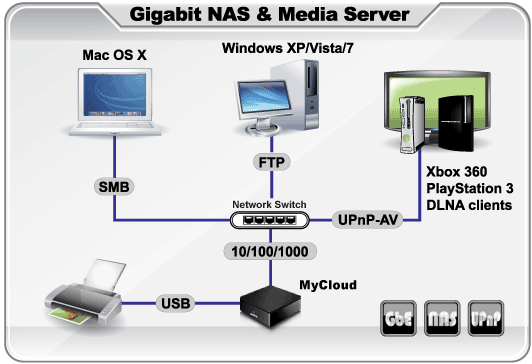
Once configured the unit worked well. It provided two USB ports to connect external USB hard disks that can be used to hold video, photo and music data for the network as well as a eSATAII 3Gbps connector. The device can then deliver this content anyone on the workgroup of the node and also remotely through the web. The device acts as a web server the is addressable from the outside, but through the web and a browser. The unit is addressed and configured through a well thought out web browser interface at an external website that talk back to the device though its MAC address. The device was tested with both a standard external HDD, and external SDD on the eSATA and USB and an Xbox360 through the network as connections in addition to a Windows PC.
The only glitch in the setup and testing was the initial installation. The device connect though the myakitio.com website to communicate with the device. The device was tested on a network that contains a wired network, 802.11n wireless network and PLC network branch connected to a single router with firewall and a large wired switch. The network did not immediately locate and identify the device when it was connected into the PLC network branch or through the external 1GE switch. Once the device was directly connected to the switch ports on the back of the router, ti was located by the network and configured with DHCP. In order to configure the device through the firewall (set in default conditions for the testing and just enabled – tests were make on both a DLINK and a Linksys 4port 1GE switch with MIMO 802.11n compatible wireless router) the settings needed to be adjusted to allow a tunnel to the MAC address of the device for it to be seen by the web.
The mounting of the drives is menu driven and works quite intuitively. Once configured the device was easily addressable by the network and the PC and Xbox. The Xbox was tested to view an SD video and several JPGs without issue. We also tested connecting to the device from a Galaxy Tab which had Android OS loaded. The app was easy to install and allowed for wireless access to the device for the both the videos and stills. The device behaved well in the network and did not disrupt existing backup flows or other network operations.
The device support RAID and also can be used as a centeralized NAS for a the system. More importantly, it can operate as a second NAS in an existing system that may already have storage, now enabling remote and additional device access that may not be available with a standard traditional NAS file store.
For those who are tech savy at an average level, this should not be a problem to setup. It may present some challenges for the community that configures devices by only plugging them in and leaving the password as “admin” with all settings as default, but this community tends to have friends who can help with the setup. The device is easily operable and stable for use by all skill levels and from multiple devices. At under $100 and about the size of 2 cell phones, it is a good media server product for those who have a mixed device environment.
